
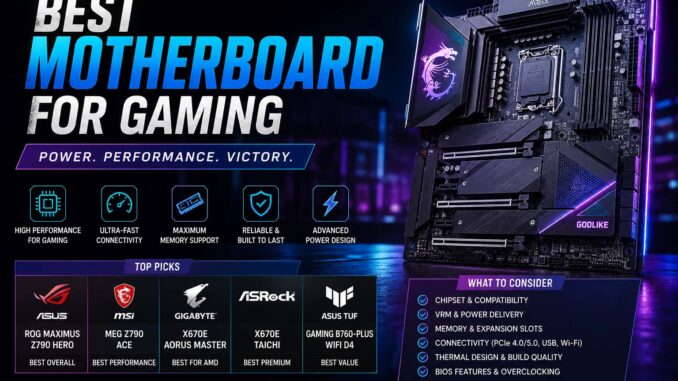
Choosing the best motherboard for gaming is one of the most important decisions when building or upgrading a gaming PC. In particular, a motherboard controls communication between your CPU, GPU, RAM, storage, and cooling systems, making it the foundation of your gaming setup.
Since modern games demand fast performance, stable connectivity, and upgrade flexibility, your motherboard directly affects system stability, overclocking potential, and overall gaming experience whether you play competitive shooters, open-world RPGs, or esports titles. Additionally, players looking for demanding modern titles can explore the best games of 2026.
In 2025, gaming motherboards are more advanced than ever, offering PCIe 5.0 support, DDR5 memory compatibility, Wi-Fi 7, faster SSD performance, and improved thermal management.
Best Motherboard for Gaming 2025 Comparison Table
| Motherboard Type | Best For | Key Features |
|---|---|---|
| AMD X670E | High-end gaming | PCIe 5.0, DDR5, strong VRM |
| B650 | Budget gaming | Affordable AM5 support |
| Intel Z790 | Competitive gaming | Overclocking and high performance |
| Mini-ITX Boards | Compact builds | Small size gaming PCs |
| Wi-Fi Gaming Boards | Wireless setups | Faster wireless connectivity |
Overall, this comparison helps gamers quickly understand which motherboard category matches their gaming goals and budget.
What Is the Best Motherboard for Gaming?
Generally, many gamers ask what is the best motherboard for gaming because there is no single answer for every player.
Instead, the best motherboard depends on:
- Your CPU choice
- Gaming resolution
- Upgrade plans
- Budget
- Overclocking needs
- Storage requirements
For example, competitive gamers may prioritize fast RAM support and stable networking, while content creators may prefer additional storage slots and USB ports.
Generally, a great gaming motherboard should provide:
- Stable power delivery
- Strong cooling support
- Modern connectivity
- Fast memory compatibility
- Future upgrade options
Ultimately, choosing the right motherboard ensures smoother gameplay and a longer system lifespan.
Best AM5 Motherboard for Gaming
Generally, the best AM5 motherboard for gaming is becoming increasingly popular because AMD’s AM5 platform supports the latest Ryzen processors and DDR5 memory.
In particular, AM5 motherboards are designed for modern gaming performance and future upgrades.
Why Gamers Choose AM5
Generally, AM5 platforms offer several advantages:
- PCIe 5.0 support
- DDR5 RAM compatibility
- Better power efficiency
- Improved gaming performance
- Long-term upgrade support
For example, popular AM5 chipset options include:
- X670E
- X670
- B650E
- B650
Generally, high-end gamers choose X670E boards because they provide premium features and advanced overclocking support.
On the other hand, budget gamers usually prefer B650 motherboards for balanced price-to-performance value.
Best AMD Motherboard for Gaming
Generally, many PC builders search for the best AMD motherboard for gaming because AMD Ryzen processors remain highly competitive in modern gaming builds.
For example, AMD gaming motherboards are known for:
- Excellent multi-core performance
- Strong gaming efficiency
- Affordable upgrade paths
- Long socket support lifespan
Recommended AMD Gaming Chipsets
X670E Chipset
B650 Chipset
Generally, B650 is perfect for mainstream gamers looking for strong gaming performance without overspending.
A620 Chipset
Generally, A620 is an entry-level option for casual gaming builds and budget setups.
Overall, AMD motherboards work especially well with high-performance GPUs and modern gaming CPUs.
Key Features in a Gaming Motherboard
Generally, understanding motherboard features helps gamers avoid compatibility problems and performance bottlenecks.
VRM Quality
Generally, Voltage Regulator Modules control power delivery to the CPU.
For example, better VRMs improve:
- System stability
- Overclocking performance
- Thermal efficiency
Therefore, this matters for demanding games and streaming setups.
PCIe Support
Generally, modern GPUs and SSDs use PCIe connections.
For example, PCIe 5.0 provides:
- Faster storage speeds
- Better future compatibility
- Improved bandwidth for high-end GPUs
Therefore, gamers building long-term systems should prioritize PCIe 5.0 support.
Gaming RAM Compatibility
Generally, DDR5 memory is now the standard for modern gaming systems.
For example, benefits include:
- Faster speeds
- Better multitasking
- Improved gaming performance
As a result, motherboards with higher RAM-frequency support often deliver smoother gameplay in CPU-heavy games.
Motherboard Cooling Features
Generally, gaming PCs generate significant heat.
For example, strong motherboard cooling features include:
- VRM heatsinks
- Fan headers
- Liquid cooling support
- Thermal monitoring systems
Ultimately, good cooling improves stability during long gaming sessions.
Gaming Connectivity Options
Generally, modern gamers need reliable connectivity for online gaming and streaming.
For example, important features include:
- Wi-Fi 6E or Wi-Fi 7
- 2.5G Ethernet
- USB-C ports
- Multiple M.2 SSD slots
As a result, these features improve gaming convenience and performance. Additionally, users interested in lightweight browser play can explore the best unblocked games websites.
How to Choose the Right Gaming Motherboard
Generally, choosing the best motherboard for gaming becomes easier when following a simple process.
Step 1: Choose Your CPU
In particular, your processor determines motherboard compatibility.
While AMD Ryzen CPUs require AM5-compatible boards, Intel processors use different sockets.
Step 2: Decide Your Gaming-PC Budget
Generally, gaming motherboards range from budget-friendly to premium enthusiast models.
For example, general price ranges include:
- Budget: Entry-level gaming
- Mid-range: Balanced performance
- Premium: Advanced features and overclocking
Above all, avoid overspending on features you may never use.
Step 3: Consider Future Upgrades
Generally, future-proofing helps extend system lifespan.
For example, look for:
- Extra RAM slots
- PCIe 5.0 support
- Additional SSD storage
- Better cooling options
Ultimately, upgrade-friendly motherboards save money long term.
Best Motherboard Features for Competitive Gaming
Generally, competitive gamers prioritize low latency and stable performance.
For example, recommended features include:
- High-speed Ethernet
- Fast RAM support
- Strong VRMs
- BIOS optimization tools
- Reliable cooling systems
In particular, games like Valorant, Fortnite, Apex Legends, and Call of Duty benefit from stable high-frame-rate performance.
Common Gaming-Motherboard Problems and Fixes
Generally, motherboard issues can impact gaming performance.
System Not Booting
For example, possible causes include:
- Incorrect RAM installation
- BIOS incompatibility
- Loose power cables
Generally, updating the BIOS and reseating components fixes the issue.
Overheating Problems
Sometimes, poor airflow or weak VRM cooling can cause overheating.
Fix
Therefore, use better case airflow and install additional cooling fans.
RAM Instability
Sometimes, incorrect RAM settings may cause crashes.
Fix
Therefore, enable XMP or EXPO profiles in BIOS settings for stable memory performance.
Slow Gaming Performance
Sometimes, older motherboards may limit SSD and GPU speeds.
Fix
Therefore, upgrade to newer PCIe-supported gaming motherboards.
Why Motherboards Matter for Gaming Performance
Generally, some gamers underestimate motherboard importance.
Although GPUs and CPUs handle most gaming tasks, motherboards affect:
- System reliability
- Upgrade flexibility
- Power efficiency
- RAM performance
- SSD speed
- Thermal stability
As a result, a poor-quality motherboard can reduce the effectiveness of expensive gaming components. Meanwhile, players interested in gaming experiences on earlier hardware can explore the best wii games.
FAQ About the Best Motherboard for Gaming
What Is the Best Motherboard for Gaming in 2025?
Generally, the best motherboard depends on your budget and CPU choice, but AM5 X670E and B650 boards are among the top gaming options in 2025.
Is AM5 Good for Gaming?
Yes. In fact, AM5 supports modern Ryzen processors, DDR5 memory, and PCIe 5.0 technology.
Do Gaming Motherboards Improve FPS?
Generally, a motherboard does not directly increase FPS dramatically, but it improves stability, RAM performance, and upgrade support.
What Motherboard Size Is Best for Gaming?
Generally, ATX is the most popular choice for gaming because it offers the best balance of expansion slots, cooling support, and upgrade options. However, Micro-ATX and Mini-ITX are also excellent choices if you prefer a smaller PC build.
Should Gamers Choose DDR4 or DDR5?
Generally, DDR5 is recommended for newer gaming systems because it offers faster performance and future compatibility.
Is Wi-Fi Important on Gaming Motherboards?
Generally, wired Ethernet is best for competitive gaming, but Wi-Fi 6E and Wi-Fi 7 are useful for wireless setups.
Conclusion
Overall, finding the best motherboard for gaming is essential for building a stable, powerful, and future-ready gaming PC. In particular, modern motherboards in 2025 provide advanced technologies such as DDR5 memory, PCIe 5.0 support, faster networking, and improved cooling systems.
Whether you are building a competitive esports setup, a high-end streaming PC, or a budget gaming system, choosing the right motherboard ensures smoother gameplay, better upgrade potential, and long-term reliability.