
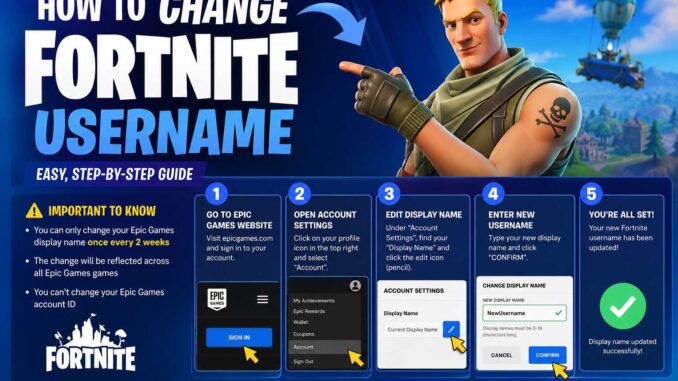
If you’re wondering how to change Fortnite username, the process is actually simple once you know where to look. Your Fortnite display name is managed through your Epic Games account, not directly inside the game. That means whether you play on PC, PlayStation, Xbox, Nintendo Switch, or mobile, you’ll usually update your display name through Epic Games and then log back into Fortnite.
This guide explains every step, covers platform-specific details, and answers the most common questions players have about changing their Fortnite username.
How to Change Fortnite Username in a Few Minutes
The quickest way to update your Fortnite name is through your Epic Games account.
Follow these steps:
- Open the Epic Games website.
- Sign in to your Epic Games account.
- Click your profile icon.
- Select Account.
- Open the Account Settings page.
- Find the Display Name section.
- Enter your new username.
- Confirm the change.
- Save your changes.
The next time you launch Fortnite, your new display name should appear after the account update has synced.
If you’re returning after a long break and aren’t sure about the current game content, checking what fortnite season is it can help you catch up before jumping into your next match.
How to Change Fortnite Username on PC
PC players have the simplest experience because Fortnite uses the Epic Games account directly.
Steps for PC
- Close Fortnite if it’s running.
- Visit the Epic Games website.
- Log into your account.
- Go to Account Settings.
- Edit your display name.
- Confirm the security verification.
- Save your changes.
- Restart Fortnite.
Your updated username should appear throughout the game, including your friends list and party lobby.
How to Change Fortnite Username on PlayStation
PlayStation players have two possible situations.
If Your Account Uses Epic Games
Changing the Epic Games display name updates the Fortnite username.
If You’re Using Your PlayStation Network Name
Your PlayStation Online ID may also affect how your account appears outside Fortnite.
In that case:
- Change your PSN Online ID through PlayStation settings if needed.
- Verify your Epic Games account is linked correctly.
Most modern Fortnite accounts rely primarily on the Epic Games display name.
How to Change Fortnite Username on Xbox
Xbox players also manage their Fortnite identity through Epic Games in most cases.
If your Epic account is linked correctly:
- Sign in on the Epic Games website.
- Change the display name.
- Restart Fortnite.
Your Xbox Gamertag remains separate from your Fortnite display name.
How to Change Fortnite Username on Nintendo Switch
Nintendo Switch players follow the same process.
Simply:
- Log into your Epic Games account.
- Update the display name.
- Restart Fortnite.
Changing your Nintendo profile nickname alone does not always change your Fortnite display name.
How to Change Fortnite Username on Mobile
Although Fortnite’s availability varies depending on your mobile platform and region, the account management process remains the same.
Open the Epic Games website in your browser and update your display name through your account settings.
After logging back into Fortnite, the new username should appear automatically.
How to Change Your Username on Fortnite If You Forgot Your Login
Some players know their current Fortnite name but can’t remember their Epic Games login.
Here’s what you should do:
- Visit the Epic Games sign-in page.
- Choose Forgot Password if necessary.
- Recover access using your email.
- Sign back into your account.
- Change the display name.
Without access to your Epic Games account, you cannot update your Fortnite username.
How Often Can You Change Your Fortnite Username?
Epic Games limits how frequently players can change their display names.
At the time of writing, players generally need to wait two weeks (14 days) before changing the display name again.
Because policies can change, always check the latest account information before planning another name change.
Rules for Choosing a New Username
Not every name will be accepted.
Your display name should:
- Be unique
- Follow Epic Games community guidelines
- Avoid offensive language
- Avoid impersonating other players
- Meet the character requirements
If your preferred name is unavailable, consider adding:
- Numbers
- Initials
- Symbols (when permitted)
- Creative variations
Why Can’t I Change My Fortnite Username?
Several issues can prevent a successful name change.
The Display Name Is Already Taken
Try another variation.
You’ve Changed It Recently
You’ll need to wait until the cooldown period expires.
You’re Logged Into the Wrong Account
Verify you’re editing the Epic Games account linked to Fortnite.
Browser Problems
Try:
- Refreshing the page
- Clearing browser cache
- Using another browser
- Signing in again
These simple fixes solve many account-related issues.
Does Changing Your Username Affect Progress?
No.
Changing your display name does not remove:
- Skins
- V-Bucks
- Battle Pass progress
- Wins
- Friends
- Locker items
- Purchased cosmetics
- Level progression
Everything remains attached to your Epic Games account.
If you’re actively progressing through seasonal rewards, it’s also useful to know when does the battle pass end so you don’t miss any unlocks before the current season finishes.
How to Change Username on Fortnite Without Losing Friends
Many players worry that changing names will confuse friends.
Fortunately:
- Your Epic account remains the same.
- Friends stay on your list.
- Purchased content remains unchanged.
Your friends will simply see your new display name after the update.
Tips for Choosing a Great Fortnite Username
A memorable username makes it easier for teammates to recognize you.
Good usernames are often:
- Short
- Easy to pronounce
- Easy to spell
- Original
- Consistent across games
Avoid using long strings of random numbers unless they’re meaningful to you.
Many competitive players also use the same username across multiple games to build a recognizable identity.
Common Mistakes to Avoid
Changing your username is straightforward, but players still make a few common mistakes.
Avoid these issues:
- Editing the wrong Epic Games account
- Forgetting your login email
- Trying to change the name before the cooldown ends
- Expecting console nicknames to update automatically
- Closing the browser before saving changes
Taking an extra minute to verify each step can prevent unnecessary frustration.
Quick Reference Guide
| Task | Where to Do It |
|---|---|
| Change Fortnite username | Epic Games Account Settings |
| Update PlayStation Online ID | PlayStation Settings |
| Update Xbox Gamertag | Xbox Profile |
| Update Nintendo Nickname | Nintendo Account |
| Recover Epic account | Epic Games Sign-In Page |
Troubleshooting After Changing Your Username
If your new name doesn’t appear immediately:
Restart Fortnite
Many updates appear after restarting the game.
Sign Out and Back In
Refreshing your account session often solves display issues.
Wait for Synchronization
Account changes occasionally take a little time to update across servers.
Verify the Correct Account
If you have multiple Epic Games accounts, confirm you’re using the correct one.
If Fortnite crashes while restarting after the update, the problem is usually unrelated to your display name. General troubleshooting steps from our guide on pc keeps crashing while gaming may help identify hardware or software issues affecting your system.
Frequently Asked Questions
How to change your username on Fortnite?
Sign into your Epic Games account, open Account Settings, edit your Display Name, confirm the change, and save it.
How to change username on Fortnite for free?
Changing your Epic Games display name is free, provided you follow Epic Games’ account policies and cooldown rules.
How to change your Fortnite username on console?
Most console players change their Fortnite display name through their linked Epic Games account rather than directly from the console.
Can I use my old username again?
If your previous display name becomes available and your account meets Epic Games’ requirements, you may be able to use it again. Availability is not guaranteed.
Does changing my Fortnite username reset my account?
No. Your cosmetics, purchases, statistics, achievements, friends, and progression remain attached to your Epic Games account.
Final Tips Before You Rename Your Account
Learning how to change Fortnite username only takes a few minutes once you know that your display name is managed through your Epic Games account. Before confirming your new name, make sure it’s something you’ll be happy using for a while, since you’ll need to wait before changing it again. Pick a name that’s easy for teammates to recognize, follows Epic Games’ guidelines, and reflects your gaming style. Once you’ve updated it, restart Fortnite and enjoy dropping into your next match with your new identity.