
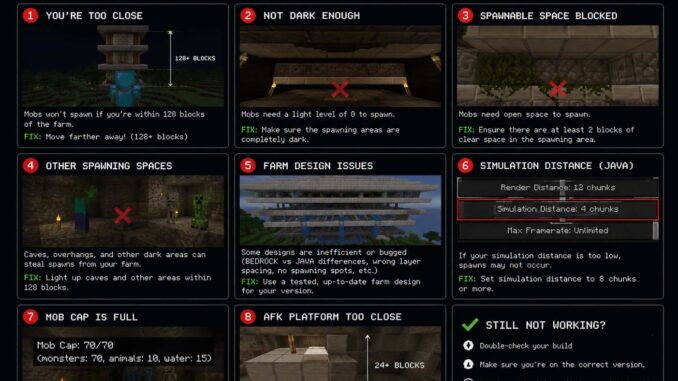
You’ve finally finished building a mob farm, but nothing seems to be spawning. If you’ve been asking why is my mob farm not working, you’re not alone. Fortunately, most mob farm problems have a simple explanation, and you usually don’t need to rebuild the entire structure.
Minecraft mob spawning depends on several conditions, including light levels, player distance, difficulty, suitable blocks, and nearby mobs. Therefore, checking these factors one by one is the best way to identify the problem.
Whether you’re playing Java or Bedrock Edition, this guide explains the most common causes and shows you how to get your mob farm working efficiently again.
Why Is My Mob Farm Not Working? Start With These Checks
Before rebuilding your farm, work through this troubleshooting checklist. In many cases, one incorrect setting or overlooked spawning condition is responsible.
| Check | Why It Matters |
|---|---|
| Light level | Hostile mobs need suitable darkness to spawn. |
| Player distance | Mobs cannot spawn or remain active at every distance. |
| Difficulty setting | Peaceful difficulty prevents normal hostile mob spawning. |
| Nearby caves | Other spawning locations can reduce farm efficiency. |
| Spawnable blocks | Certain blocks prevent mobs from spawning. |
| Mob cap | Too many existing mobs can limit additional spawns. |
| Simulation distance | Bedrock farms depend on active simulation areas. |
Start with the easiest checks first. Then, test your farm after each change so you can identify the actual cause instead of making unnecessary modifications.
1. Why Is My Mob Farm Not Working? Check the Light Level
Insufficient darkness is one of the first things to investigate when a hostile mob farm stops producing mobs.
In modern Minecraft versions, ordinary hostile mobs generally require a block light level of zero to spawn in the Overworld. However, specific mobs and special spawning conditions can follow different rules.
Light can enter your farm through several sources, including:
- Torches and lanterns
- Glowstone and sea lanterns
- Open entrances and gaps in the walls
- Sunlight reaching exposed platforms
- Other nearby light sources
Consequently, inspect every spawning floor, roof, and corner for unwanted light.
Cover openings and remove unnecessary light sources from the spawning chambers. Meanwhile, keep lighting your surrounding base and walkways for safety.
Important: Don’t assume that every mob in every dimension follows the same light requirements. Check the rules for the specific mob you’re trying to farm.
2. Check Your Player Distance From the Mob Farm
Player positioning is another common reason a Minecraft mob farm produces little or nothing.
In Java Edition, ordinary hostile mobs generally cannot spawn within 24 blocks of a player. Natural spawning also depends on the applicable spawning range and simulation conditions.
Therefore, standing directly beside the spawning platform may prevent mobs from appearing.
On the other hand, moving too far away can cause mobs to despawn or stop being processed, depending on the edition and distance involved.
To fix the problem:
- Move to a suitable AFK platform.
- Check the recommended AFK position for your specific farm design.
- Make sure mobs can reach the collection chamber.
- Avoid moving outside the farm’s effective operating range.
If the farm is designed around a particular height, follow its original instructions. Even a small change in player position can affect performance.
3. Why Is My Minecraft Mob Farm Not Working With Nearby Caves?
If your farm works but produces very few mobs, competing spawn locations may be responsible.
Minecraft can generate hostile mobs in eligible areas outside your farm. As a result, nearby caves and dark underground spaces can compete with your spawning platforms.
This problem is particularly noticeable in farms that rely on controlling the available spawning spaces.
Try these improvements:
- Light up accessible caves near your base.
- Spawn-proof eligible surfaces around the farm.
- Check dark tunnels and underground chambers.
- Build an elevated farm when its design supports that approach.
- Test the farm from a suitable AFK position.
Building above an ocean can reduce some competing land-based spawning locations. However, it doesn’t automatically eliminate every possible source of interference.
Likewise, lighting nearby caves can help, but the effective area depends on your edition, farm design, and player position.
If you’re gathering resources before building or improving your farm, our guide to best level for diamonds 1.20 can help you prepare for underground exploration.
4. Make Sure Minecraft Isn’t Set to Peaceful
Sometimes the problem is simply your world difficulty.
Peaceful difficulty prevents normal hostile mobs such as zombies, skeletons, and creepers from naturally spawning. Consequently, a conventional hostile mob farm won’t work as expected.
Check your difficulty setting and switch to Easy, Normal, or Hard if appropriate for your world.
Also, make sure natural monster spawning hasn’t been disabled through a game rule or server configuration.
In newer Java versions, the spawnMonsters game rule controls natural monster spawning. If that setting is disabled, changing the difficulty alone may not solve the problem.
After checking the settings, wait a short time at the correct AFK position and observe the spawning platforms.
5. Why Is My Mob Farm Not Working in Bedrock Edition?
Bedrock Edition and Java Edition don’t handle every spawning condition identically. Therefore, a farm copied directly from a Java tutorial may perform poorly or fail in Bedrock.
Important differences include:
- Mob spawning and despawning behavior
- Simulation distance
- Mob density and spawning limits
- Player positioning requirements
- The mechanics used by particular farm designs
Simulation distance is especially important in Bedrock Edition because it determines which nearby areas continue processing game mechanics.
For that reason, always choose a tutorial designed for your Minecraft edition and version.
If you’re using Bedrock, verify the simulation distance, check the recommended AFK location, and make sure the spawning platforms are inside the farm’s effective operating area.
For additional technical details, consult the official Minecraft Bedrock spawn rules documentation.
6. Check Whether Your Spawning Blocks Are Suitable
Even when the lighting and player distance are correct, unsuitable blocks can prevent mobs from spawning.
Ordinary hostile mobs generally require an appropriate solid spawning surface and enough space for the mob to appear. However, the exact requirements vary by mob.
Commonly suitable surfaces include many full blocks, such as stone and cobblestone, when the other spawning conditions are satisfied.
Meanwhile, the following blocks or arrangements can prevent ordinary spawning in many conventional mob farms:
- Glass blocks
- Bottom slabs
- Carpets
- Leaves
- Buttons
- Rails
Don’t assume that every block in these categories behaves identically in every situation. Instead, compare your platform with the requirements of the specific mob farm you’re building.
Check every spawning layer carefully. A misplaced slab, carpet, or other non-spawnable block can reduce the usable area significantly.
7. Why Is My Mob Farm Not Working When Water Streams Are Installed?
Sometimes mobs spawn correctly but never reach the collection chamber. In that situation, the problem may be your water transport system rather than spawning itself.
Water-based farms depend on carefully positioned streams, channels, trapdoors, and drop shafts. If any component is misplaced, mobs can become stuck or remain on the platform.
Inspect the following:
- Water flows toward the intended collection point.
- Source blocks and flowing water are positioned correctly.
- Signs or other water-stopping blocks are installed properly.
- Trapdoors and openings match the farm design.
- No gaps allow mobs to become trapped outside the collection route.
Next, watch the farm from a safe location. If mobs appear on the spawning platforms but don’t reach the killing chamber, focus on transportation and pathfinding instead of changing the lighting.
8. Check Whether the Mob Cap Is Limiting Your Farm
Minecraft limits natural mob populations under its spawning rules. Therefore, existing mobs can reduce the number of additional mobs your farm produces.
For example, hostile mobs may spawn in nearby caves or other eligible locations before your farm gets enough spawning opportunities.
To improve performance, identify and reduce competing spawn locations where practical.
You can also inspect nearby areas for mobs that remain alive and occupy relevant population limits. However, the exact limits and spawning behavior depend on the edition, game version, and type of mob.
Don’t assume that the mob cap is always the problem. First, verify that the farm has suitable darkness, correct player positioning, and appropriate spawning blocks.
9. Spawn-Proof the Area Around Your Mob Farm
Spawn-proofing helps direct more spawning opportunities toward the farm instead of nearby surfaces.
Depending on the location and block arrangement, you can use:
- Lighting in caves and dark areas
- Bottom slabs on suitable surfaces
- Carpets where appropriate
- Other blocks or arrangements that prevent the target mobs from spawning
Water can also prevent some ordinary hostile mobs from spawning on covered surfaces, although it isn’t a universal solution for every mob or farm design.
Focus on the areas that can actually compete with your farm. For example, an underground farm may need different preparation from an elevated farm built above an ocean.
If you’re gathering materials for a larger base project, our guide to best Y level for iron can help you prepare while exploring underground areas.
10. Check Your Simulation Distance and Loaded Chunks
Simulation distance determines which areas of a Minecraft world actively process game mechanics. In Bedrock Edition, this includes mob spawning, entity behavior, and fluid movement.
Consequently, a farm can appear broken if its important components aren’t being simulated as expected.
Check the following:
- Your simulation distance setting
- Whether the player is positioned correctly
- Whether the spawning platforms are inside the active area
- Whether mobs can reach the collection system
- Whether water and other mechanisms continue functioning
Increasing simulation distance isn’t always the best solution because higher settings can increase performance demands. Instead, use the distance recommended for your design and device.
In Java Edition, also consider the server’s simulation settings and entity processing rules if you’re playing multiplayer.
11. Is Your Mob Farm Built Too Low?
Farm height can influence efficiency because it changes the relationship between the player, spawning platforms, and competing spawn locations.
For this reason, some conventional hostile mob farms are built high above the ground or over deep water.
An elevated design may reduce the number of competing spawnable surfaces. Additionally, it can make it easier to control the player’s position relative to the spawning chambers.
However, building higher isn’t automatically better for every farm. Specialized farms, including certain slime, spawner, and structure-based designs, follow different requirements.
Before relocating your farm, check whether its original design depends on a particular height or biome.
12. Fix Common Mob Farm Design Mistakes
If you’ve checked the game settings and spawning conditions without finding a problem, examine the farm’s construction.
Are the Spawning Platforms Too Small?
Smaller platforms offer less space for mobs to spawn. Consequently, a farm with limited spawning area may produce fewer mobs than a larger design.
However, increasing the platform size alone won’t solve problems caused by light, player distance, or competing mobs.
Is the Ceiling Height Incorrect?
Different mobs require different amounts of space. If the ceiling is too low, some mobs may be unable to spawn.
Compare the available vertical clearance with the requirements of your target mob.
Can Mobs Reach the Killing Chamber?
Poorly positioned trapdoors, blocked water channels, or incorrect drop shafts can interrupt the collection process.
Observe the entire route from the spawning platform to the collection chamber. Then, correct any bottlenecks you find.
Does the Farm Match Your Minecraft Version?
Updates can change spawning rules, game mechanics, or available settings. Therefore, an older tutorial may no longer work exactly as shown.
Check the design’s supported game version before rebuilding the structure.
Java vs. Bedrock Mob Farms: What Should You Know?
Both editions support mob farms, but their mechanics aren’t identical.
| Feature | Java Edition | Bedrock Edition |
|---|---|---|
| Spawning mechanics | Uses Java-specific spawning rules | Uses Bedrock-specific spawning rules |
| Simulation settings | Depends on world or server configuration | Simulation distance directly affects active game mechanics |
| AFK positioning | Must match the farm’s spawning range | Must match spawning and simulation requirements |
| Farm tutorials | Choose designs made for Java | Choose designs made for Bedrock |
| Performance | Depends on design and world conditions | Depends on design, device, and world settings |
This is why a farm copied from a video may fail in a different edition. Even if the structure looks identical, the spawning conditions may not be.
Advanced Tips to Improve Mob Farm Efficiency
Once your farm works consistently, you can make further improvements.
First, inspect the spawning area for unnecessary light and confirm that the AFK position is correct. Next, make sure mobs move efficiently toward the collection chamber.
You can then consider these upgrades:
- Add spawning layers if the design supports them.
- Increase usable spawning space.
- Improve water timing and mob transport.
- Remove light leaks.
- Spawn-proof competing areas.
- Adjust simulation settings when appropriate.
- Follow a farm design tested for your game edition.
Remember that more layers don’t always mean better performance. If the mob cap or another spawning condition is already limiting output, adding platforms may make little difference.
If you’re planning to use a powerful weapon while testing your setup, our guide to best enchantments for mace explains how different enchantments can improve your combat options.
Frequently Asked Questions About a Mob Farm Not Working
Why aren’t any mobs spawning in my mob farm?
The most common causes include incorrect light levels, unsuitable blocks, Peaceful difficulty, incorrect player distance, and competing spawn locations. Start with these checks before rebuilding the structure.
Why is my Minecraft mob farm so slow?
Slow output can result from competing spawn locations, limited spawning space, an incorrect AFK position, or a collection system that doesn’t move mobs efficiently. Therefore, identify whether mobs fail to spawn or simply fail to reach the collection chamber.
Does building a mob farm higher improve efficiency?
It can. Elevated farms may reduce competing spawn locations and make player positioning easier to control. However, the best height depends on the design, edition, and target mob.
Why does my mob farm work sometimes but not always?
Mob spawning depends on several conditions, including player position, nearby mobs, loaded areas, and game settings. If any of these conditions change, the farm’s performance can change as well.
Can Minecraft updates break mob farms?
Yes, an update can affect mechanics or settings that a particular design depends on. If your farm stops working after an update, check the release notes and look for a version-compatible design before rebuilding it.
Why is my mob farm not working in Bedrock but working in Java?
The two editions use different spawning mechanics and simulation behavior. As a result, a Java design may not produce the same results in Bedrock. Use an edition-specific tutorial and verify the recommended simulation distance and AFK position.
Final Thoughts: Get Your Minecraft Mob Farm Working Again
If you’ve been wondering why is my mob farm not working, start by checking the simplest explanations. Light levels, player distance, difficulty settings, unsuitable blocks, and competing spawn locations are all worth investigating.
Rather than rebuilding everything immediately, test one change at a time. First, confirm that mobs can spawn. Next, check whether they move through the collection system. Finally, optimize the design once the basic mechanics work correctly.
With the right spawning conditions and a farm designed for your Minecraft edition, you can produce a steady supply of experience, loot, and useful resources for your survival world.