
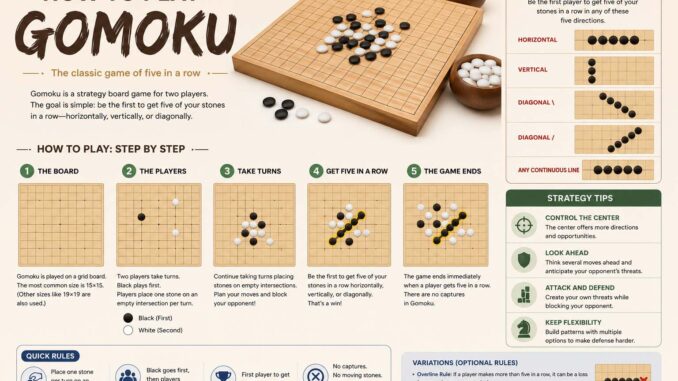
Gomoku is a classic strategy board game that has become increasingly popular through mobile gaming apps, online platforms, and multiplayer games like GamePigeon. Therefore, many players search for how to play Gomoku because the game looks simple at first but becomes highly competitive at advanced levels.
Overall, the objective is straightforward: place five of your pieces in a row before your opponent does. However, mastering Gomoku requires planning, defense, positioning, and tactical thinking.
What Is Gomoku?
Generally, Gomoku is a turn-based strategy game traditionally played on a 15×15 board. In particular, two players compete by placing black and white stones on the grid.
The goal is simple:
- Create five connected stones in a row
- The row can be horizontal, vertical, or diagonal
Originally, the game came from East Asia and is often compared to games like chess or tic-tac-toe because of its strategic gameplay. Similarly, players developing deeper planning skills can explore chess strategies for beginners.
Today, modern versions of Gomoku are available on:
- Mobile apps
- Online gaming websites
- iPhone GamePigeon
- Browser games
- PC strategy platforms
Although its mechanics are easy to learn, the game still offers competitive depth for advanced players.
Gomoku Quick Rules Table
| Feature | Details |
|---|---|
| Players | 2 |
| Objective | Connect 5 stones in a row |
| Board Size | Usually 15×15 |
| Winning Direction | Horizontal, vertical, diagonal |
| Match Length | Short to medium |
| Skill Level | Beginner to advanced |
Overall, this simple structure makes Gomoku easy to start but difficult to master.
Gomoku How to Play Step by Step
Generally, many beginners ask “gomoku how to play” because the game rules are simple but strategy matters heavily.
Step 1: Start the Gomoku Match
Initially, one player uses black stones while the other uses white stones.
Traditionally, black moves first.
Step 2: Place Stones on the Grid
Generally, players take turns placing one stone at a time on an empty intersection of the board.
Since a stone usually cannot be moved once placed, each move should be planned carefully.
Step 3: Build Gomoku Connections
Winning lines can be:
- Horizontal
- Vertical
- Diagonal
Step 4: Block Your Opponent
In Gomoku, defense is extremely important. Therefore, prevent your opponent from creating strong lines.
Step 5: Create Multiple Threats
Generally, advanced players try to create multiple winning opportunities simultaneously.
As a result, this forces opponents into difficult defensive situations.
Basic Gomoku Strategies for Beginners
Although Gomoku rules are simple, strategy makes a huge difference.
Control the Center
Generally, center positions provide more opportunities for expansion and defense.
Build Flexible Shapes
Above all, avoid placing stones randomly. Instead, try to create multiple possible lines.
Watch Opponent Patterns
Always monitor enemy formations before focusing only on offense.
Avoid Edge Traps
Generally, beginners waste moves near corners or edges too early.
Think Several Moves Ahead
In particular, strong players plan future attacks before placing stones.
Ultimately, practicing these fundamentals improves gameplay quickly.
Advanced Gomoku Tips
Generally, experienced players use more complex strategies to dominate matches.
Create Double Threats
Generally, a double threat means creating two possible winning moves at once.
As a result, this often guarantees victory because opponents can only block one threat.
Use Open Fours
Generally, an open four occurs when four connected stones have open spaces on both sides.
In fact, this is one of the strongest offensive setups in Gomoku.
Learn Pattern Recognition
Generally, competitive players memorize common attack and defense patterns.
As a result, recognizing these patterns speeds up decision-making.
Force Defensive Moves
Generally, strong players pressure opponents constantly until mistakes happen.
Ultimately, advanced strategy becomes increasingly important against skilled opponents.
How to Play Gomoku GamePigeon
Generally, a large number of players specifically search for how to play Gomoku GamePigeon because it is popular on iPhone messaging.
In particular, GamePigeon allows players to challenge friends directly through iMessage.
How to Start Gomoku on GamePigeon
Step 1: Install GamePigeon
First, download the GamePigeon app from the App Store.
Step 2: Open iMessage
Next, start a conversation with a friend.
Step 3: Launch GamePigeon
Then, select Gomoku from the game list.
Step 4: Begin the Match
Finally, players take turns placing stones directly inside the chat interface.
Overall, the mobile format makes Gomoku convenient for casual gaming and quick matches. Similarly, players looking for another skill-based game can learn how to play darts.
How to Play Gomoku on iPhone
Generally, players ask how to play Gomoku on iPhone because several mobile versions exist.
For example, the easiest methods include:
- GamePigeon
- App Store Gomoku apps
- Browser-based versions
- Online multiplayer platforms
Generally, most mobile versions follow traditional Gomoku rules with touch controls optimized for smartphones.
In addition, many apps include:
- Ranked matchmaking
- AI difficulty levels
- Online multiplayer
- Puzzle modes
- Tutorials
As a result, this makes mobile Gomoku excellent for both beginners and advanced players.
How to Play Gomoku on GamePigeon Like a Pro
Generally, winning consistently on GamePigeon requires more than basic rules knowledge.
Play Aggressively Early
In particular, early center control creates stronger long-term positioning.
Watch for Open Threes
Generally, three connected stones with open sides can quickly become winning attacks.
Avoid Tunnel Vision
Sometimes, players focus only on offense and ignore defensive threats.
Force Opponent Mistakes
Generally, pressure opponents with multiple dangerous formations.
Stay Calm During Defense
In fact, good defense often creates opportunities for counterattacks.
Ultimately, these strategies improve performance significantly in mobile matches.
Common Gomoku Mistakes
Generally, beginners repeat several common errors.
Ignoring Defense
Sometimes, players attack too aggressively while ignoring enemy threats.
Playing Too Close Together
Generally, overcrowding stones reduces flexibility.
Starting Near Edges
In most cases, central positioning is stronger early in the match.
Missing Double Threats
Generally, new players fail to recognize advanced attack patterns.
Ultimately, avoiding these mistakes helps players improve faster.
Why Gomoku Is Popular in Modern Gaming
Generally, Gomoku remains popular because it combines simplicity with deep strategy.
For example, reasons for its popularity include:
- Quick matches
- Easy-to-learn rules
- Competitive gameplay
- Mobile accessibility
- Multiplayer support
- Strategic depth
While games like chess require significant time investment, Gomoku delivers strategic gameplay in shorter sessions.
As a result, its accessibility makes it appealing for casual and competitive gamers alike. Additionally, players interested in another social game can learn how to play canasta.
Best Devices and Settings for Gomoku
Although Gomoku does not require advanced gaming hardware, some setups improve gameplay comfort.
Large Screens
Generally, tablets and larger phones make the board easier to read.
Stable Internet
In particular, online matches benefit from reliable connections.
Reduced Notifications
Generally, disabling distractions improves focus during ranked games.
Comfortable Brightness Settings
In particular, good screen visibility helps players recognize patterns faster.
Can You Play Gomoku Online?
Yes, Gomoku is widely available online.
For example, popular options include:
- Mobile apps
- Browser websites
- GamePigeon
- AI practice platforms
- Online multiplayer communities
In addition, many platforms offer ranked competitive modes and global leaderboards.
As a result, online Gomoku communities continue growing in 2026 because of mobile gaming popularity.
FAQ About How to Play Gomoku
How to Play Gomoku?
Generally, players take turns placing stones on a grid and try to connect five stones in a row before their opponent.
Gomoku How to Play for Beginners?
Generally, start by controlling the center, blocking enemy lines, and building connected formations.
How to Play Gomoku GamePigeon?
First, install GamePigeon, open iMessage, select Gomoku, and challenge a friend directly in chat.
How to Play Gomoku on iPhone?
Generally, you can play through GamePigeon, App Store apps, or online browser platforms.
How to Play Gomoku on GamePigeon Better?
Generally, focus on center control, defensive awareness, and creating multiple attack opportunities.
Is Gomoku Hard to Learn?
Although the rules are simple, advanced strategies take time and practice to master.
Conclusion
Overall, learning how to play Gomoku is easy for beginners, but mastering the game requires strategy, patience, and tactical thinking. Whether playing on a traditional board, GamePigeon, or mobile apps, Gomoku offers fast-paced competitive gameplay that rewards smart planning and pattern recognition.